
Creating a Google account and everything that you can do with it,
- Carolina Grandia Soler
- Sep 20, 2022
- 6 min read

Hello, I'm Carolina! Welcome to a new post where we will talk about all the different uses you can give to a Google account and how to create one. Today's post will be quite lengthy and it has a lot of steps, so grab something to eat or drink and pay attention.

(Photo from Mitchell Luo in Unsplash)
We all know Google, right? A multimillionaire and international company that is specialised in technological products, software, etc. Well, this company owns half of the internet (if not more), so it's no surprise that a huge number of webpages either ask you to register through a Google account or offer you that option.
These accounts include an email, a cloud (an online space where you can keep data, photos, documents...), and the usage of many Google apps that are extremely useful.
How do I create a Google account?
The steps will be the same both on iPhone and Android, so my example will be on iPhone.
First go on your favourite browser (safari, google chrome...) and search 'Google account'. (The pictures will be in Spanish, but it's quite the same distribution and structure so don't worry).

Then click on 'create an account', which will appear on the bottom of your screen.

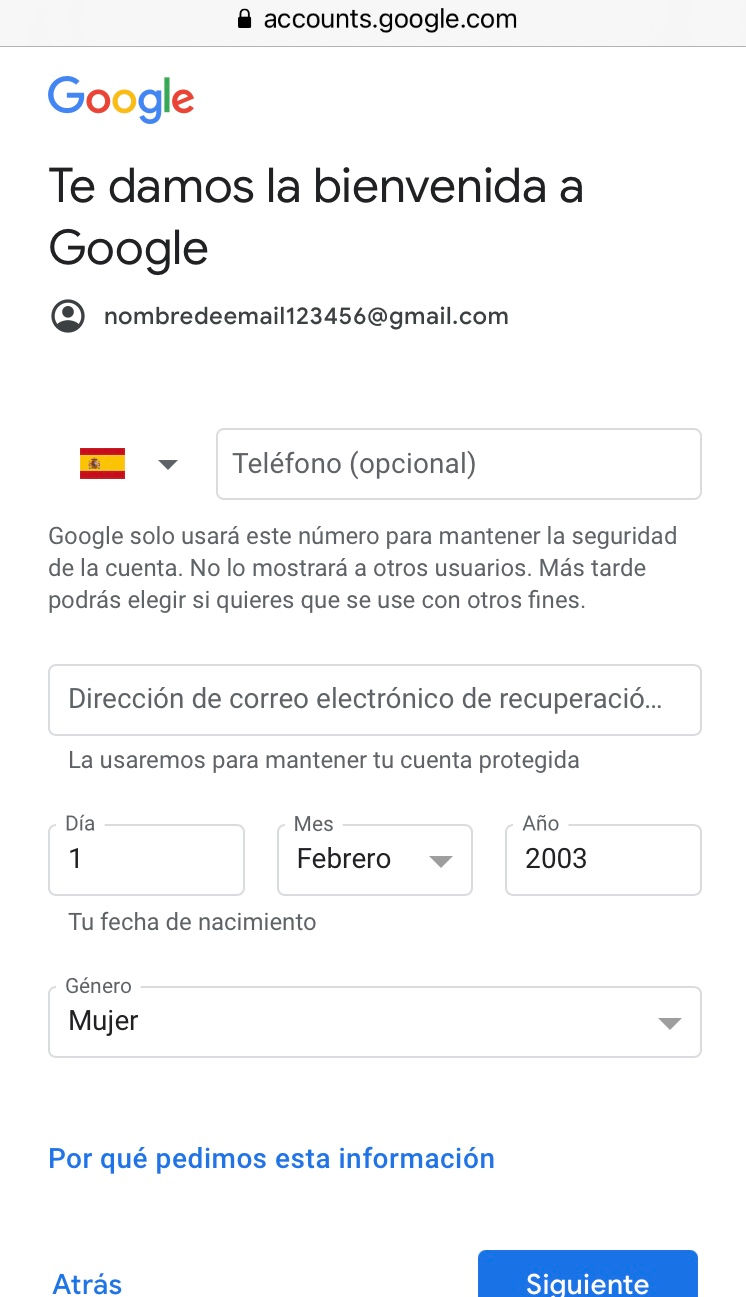
Fill in with your name and surname, then choose your email. You can make it up, write your name, your company's name... Just keep in mind that it might not be available because someone else has already chosen it.

Now you can include a recovery email/telephone number that will be used for security purposes, it's optional though. Introduce your birth date and gender and click 'next'.
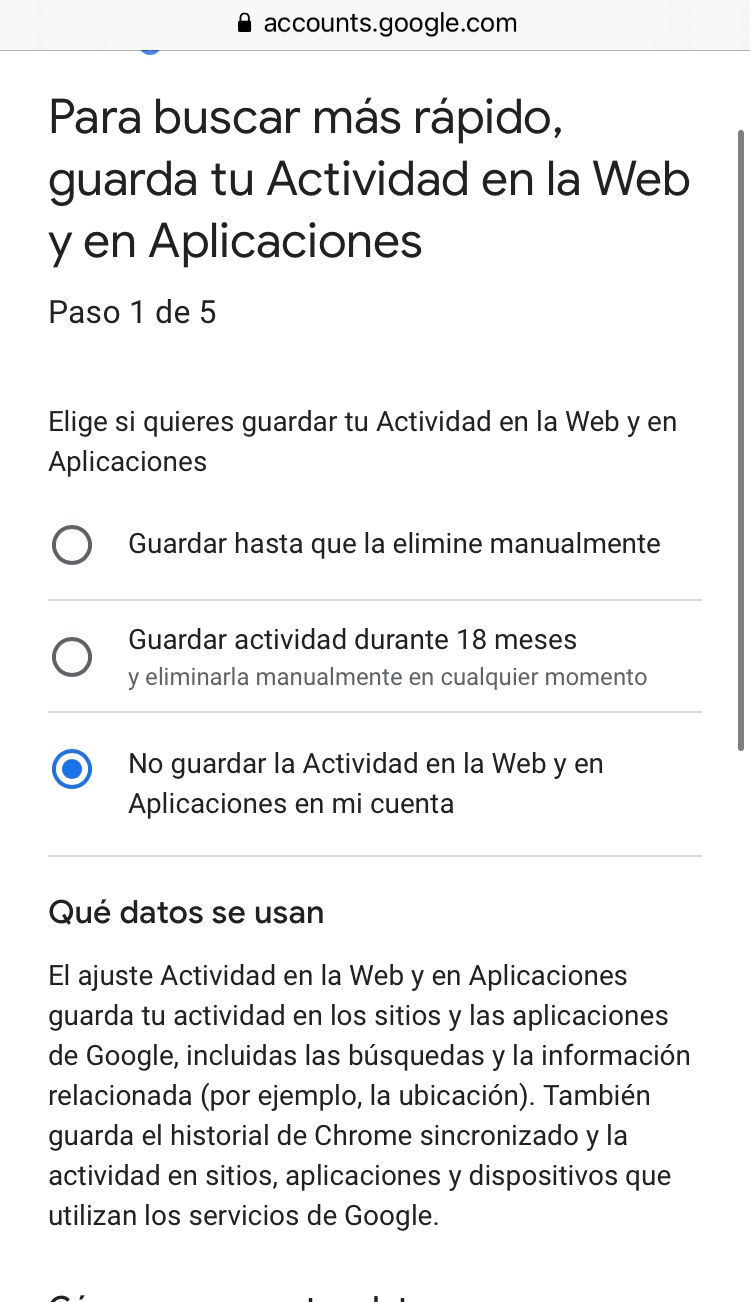
If you have paid attention to my blog, you know that online security is not a trifling matter, nor the control of your data is. So that's why I recommend choosing 'manual customisation', even if it's longer, you will find out better of how your information is used and ask them not to use it.

Now I'll give a step-by-step explanation of each customisation:
Web activity: here you can save/save for 18 months then delete/not save your activity on the web data. This information is used with the purpose of offering you a customised experience and more specific ads. I personally prefer not to save them, because if I need anything, I'm not influenced so much by ads, but rather for what i manually look for online.
YouTube's history: they use your information with the same purpose, your YouTube page being more 'fitting' to you, it showing you videos of your interest (according to what you search for online). In this section I wouldn't mind so much if they kept them, because it makes my YouTube experience more comfortable and faster.

Ads customisation: the same as in the first section, I would rather not have personalised ads, so 'generic ads' it is!

Receiving privacy notifications: Google will send you notifications when they update their privacy policy, change any law that influences it or you haven't changed your privacy preferences in a while. I find this useful, so I would personally activate them.

Final confirmation: this section explains to you that they use IDs and cookies (little files that websites send and are stores in our browsers, these can be used by other services). They are meant to avoid frauds, abuses and help with statistics. They also use these cookies for ads and measuring their efficiency (Google earns a lot from selling data, so it's no surprise).
Finally, google's privacy policy, which in short, says that they use your data for the improvement of their services, keeping some control, handling statistic data, etc. If someone wants to read it, it will be available in this section. Oh, and you must accept their policy or you won't be able to create an account, the ilusion of free choice, as they say!
That would be it, now you have a Google account! Now let's see all the different uses you can give to it.
What can I do with my Google account?
With your google account you're automatically given an email, that you can use to send/receive messages, to sign up in a bunch of websites, etc. Now you can also access Google's applications, which will be found in the top right corner when you click on the little nine dots.
I'm going to explain every program now (from left to right, top to bottom).
First you will find your account, there you can see the settings to your profile, privacy, security, payments, etc.
Then, 'search', which will take you to google's browser.
Followed by 'Google maps' ,which is a program where you can use a GPS, look for directions, routes and so much more.
YouTube is pretty well known, it's an online video platform where you will find tutorials, entertainment videos and pretty much anything! You will also be able to find CaroAlAparato's channel!
We've previously talked about Google Play, it's a service that will allow you to download other apps (everything is explained on my previous post).
'Google news' is an online newspaper.
Gmail is your email, here you will find your inbox, send and receive messages and (if you subscribe to our newsletter) receive recommendations, tips and reminders when a new post comes out!
Google meet will allow you to have meetings (with our without camera).
Google chat resembles Whatsapp, that means it's a chatting app.
Contacts, here you will find your Google contact list,
Google Drive allows you to have a place to keep your documents, photos, videos, etc. in a cloud for free. However, you will need to pay if you run out of storage.
Now we have 'Google calendar' a calendar app where you can schedule events, meetings, important dates, organise your schedule and so much more, it's pretty useful.
Google translator is that, an online translator.
Google photos is an online cloud for your photos.
Google Duo will allow you to make video calls.
Then we have 'Google shopping', which is an online shop.
Google finance is an economy app, which shows you stocks in real time and allows you to look them up, etc.
Google docs is some sort of Word, where you can write documents.
Spreadsheets is like Excel, a spreadsheet editor.
Presentations is similar to PowerPoint, here you can make... presentations (yay, surprise!).
Google books is a platform where you can look for books, although the majority will cost money and you will only have a preview for free.
Bloggeris a program used to create blogs (fun fact, we started there!).
Hangouts is just like Google chat.
Google keep will help you organise your personal information, it's sort of like the notes app.
In Google Jamboard you will find an online whiteboard, where you can write and draw.
Google classroom is well known in schools and students, as it offers lots of educative tools and was very popular in lockdown.
Google earth will show you satellite images, as it is a geographical information app. t
Google collections reminds me of Pinterest. It's a platform where you can find people like you according to what you save in your collections.
Google arts and culture is very interesting, it allows you to see a vast collection of art pieces in high quality, and it has a lot of interactive features that allow you to enjoy a fun and enriching experience!
Google ads allows you to develop your company via ads.
In podcasts you will find podcasts (audiobooks, people chatting, discussing... like a radio program).
Stadia is a videogame system.
Google one is a subscription service that offers you more storage in the cloud.
Google travels helps you to find flights, travel plans, activities, hotels and apartments. Like a mini online travel agency.
Google forms is an app that allows you to create formularies and then send them to people, publish them or do whatever you want with them.
After this complete analysis of Google's apps (I swear I didn't know there were these many!), you have seen all of the services that a Google account offers.
How do I log in with Google in other websites?
This won't be possible on all websites, but many will offer you this option. Simply look for 'log in with google' in the log in/ sign up section. Then introduce your email and password, and that would be it!.
I know this has been an extensive post, but Google has so many useful apps (which I hope you use now that you know about them), plus, now you don't have any excuse to not subscribe to my newsletter!
I hope you liked today's article and that I have explained myself well enough. I'll solve any doubt or querie in the comments, bye!
Carolina Grandía Soler - 18/09/22


Comments