
Wi-Fi, mobile data and the dangers of foreign routers.
- Carolina Grandia Soler
- Sep 15, 2022
- 3 min read

Hi! I'm Carolina and today I wanted to talk about a simple yet important topic. In today's post, we will cover how wifi and mobile data work, their differences, how to know which one we are using, and the dangers of public wifi networks.

How does Wi-Fi work?
Well, let's start by explaining some fancy words:
-Modem: a small 'box' which is installed inside of your house with a cable that connects with the internet (more or less). It is indispensable to have an internet connection at home, so internet providers will always give you one.
-Router: it takes the internet it receives from the modem and divides it into different service lines for all the devices that you connect (tablets, phones, etc.).

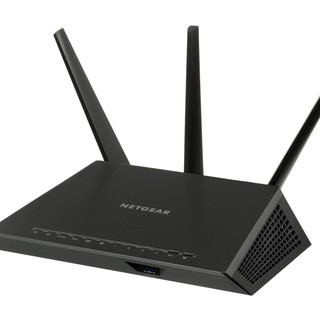


Router (left) y modem (right).
Once you understand this, you should know that Wi-Fi is a connection to the internet that is shared with numerous devices through the router.
This connection is transmitted through radio waves from the router to the connected devices, that's also how those devices communicate with each other.
And mobile data?
Mobile data works in a similar way, except that the connection comes from a telephonic operator, not from a network operator.
In addition to this, you can run out of mobile data. Depending on the plan you selected, you will have a certain amount of megas (that show the maximum loading and downloading speed that your connection allows).
Megas are being consumed when you surf the web, watch YouTube videos, listen to music, send messages, etc. You will be able to check how many megas you've consumed in your internet provider's app (I'll explain it in another post).
Of course, if you sign up for a ilimited plan, you won't run out of megas.
How can I know which one I'm using on my phone?
Although your phone usually uses Wi-Fi in your house and mobile data outside of it, sometimes you could be consuming megas without even knowing it.
To check which one we're using:
On iPhone (the bitten apple):
In the top corner (next to the battery) you will see the Wi-Fi symbol if you're connected to it. If you're using mobile data, you will see either 4G, 3G, or E.


In android:
Just like on iPhone, on the top part of your screen, the Wi-Fi symbol will appear if you're connected to it. If you see H, 3G, 4G, or E, you're consuming mobile data.
Okay, but what differences do they have?
The main differences are:
You can connect multiple devices to a router (to a Wi-Fi network), while mobile data are of individual use (although some devices do allow you to share them and use them as some sort of Wi-Fi station, but they work way slower).
Mobile data are available even when you're away from the router, which means that they are available almost everywhere (except in places where there is no signal).
Technically, mobile data are safer than Wi-Fi because Wi-Fi uses an easier-to-hack connection (unciphered).
Wi-Fi usually offers a more stable and faster connection.
Mobile data consume more battery.
And, why should we be careful when it comes to public networks?
When we connect to public networks, both the administrator and the users can steal information using various techniques. Plus, they can see everything we do on our computers (check our email, social media, and bank transactions...).
Some other ways they can attack us are:
The usage of fake wifi networks (they appear to be network connections, but you might be connecting to someone's device).
Malware (viruses) distribution within the network.
Infiltrating in our device's transactions.
And those are just three.
My advice
DON'T make bank transactions or important operations while connected to a public Wi-Fi.
DON'T use apps with personal/ delicate information while connected to public networks.
At the beginning of the URL (the web link), it will either say http or https. Try to always log in to webpages that use https (Hypertext Transfer Protocol Secure), quite the big word, I know! This is an internet protocol that provides you with a safer connection.
And that's it for today. I hope you found this useful and that I have explained myself enough.
I'll solve any doubts or queries in the comments, goodbye!
Carolina Grandía Soler - 30/8/22


Comments